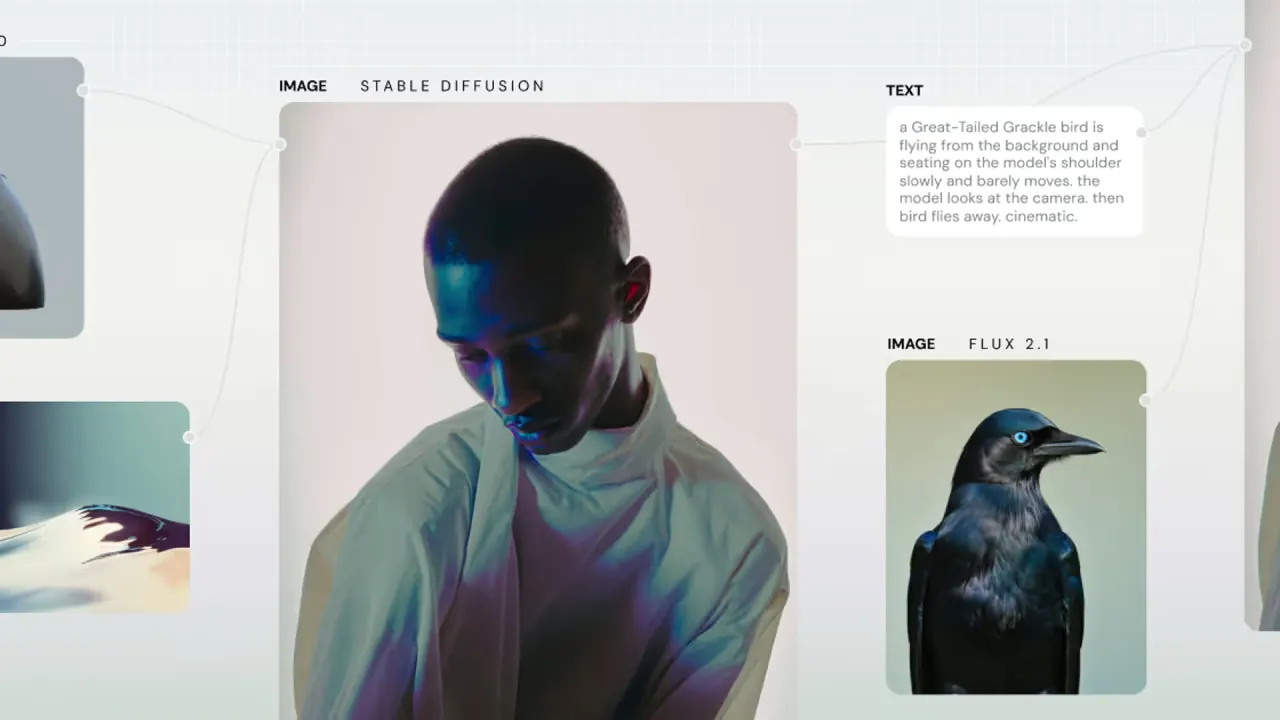

Weavy (now Figma Weave) chains image, video and 3D models with editing nodes on one browser canvas, then turns workflows into shareable tools for creative teams.
Used this tool? Rate it
Used this tool? Rate it
Weavy (now branded Figma Weave) is a browser-based platform for AI image and video generation in which third-party models and professional editing steps are wired together as nodes. Weavy brings AI models together with professional editing tools on a single, browser-based canvas, so one output can feed the next step.
Figma announced its acquisition of Weavy in October 2025. Weavy is now called Figma Weave, and its new home is weave.figma.com; the old weavy.ai address forwards there. Deal coverage reported that 20 people from Weavy would join Figma, that the valuation was not disclosed, and that the Tel Aviv startup was founded in 2024 and had raised a $4 million seed round.
For now Weavy remains a separate product: it is offered as a standalone experience at weave.figma.com and is planned to integrate into the rest of the Figma platform over time.
Weavy puts AI models and professional editing tools in one node-based platform, and the whole product is built around that idea: a node-based AI workflow where each box is either a model call or an editing operation, and the wires decide what feeds what. The same chain can then be rerun with a new prompt or input image.
Any existing workflow can be turned into a tool by adding an Output node connected to the end result. A tool hides the canvas and exposes only unlocked inputs, so teammates or clients get a simple form.
The Figma node brings a frame from a Figma Design file into a Weavy workflow, keeping the file's layout while you choose which layers Weavy may change. Finished Weave tools can also go the other way, into Figma Design (see Platforms).
Because every node can call a different vendor's model, capability, credit cost and usage rights are decided per node rather than per workspace. A workflow that mixes a cheap draft model with a premium video model, or a verified model with an unverified one, inherits the cost and terms of each step.
Clicking a model's node, or hovering over it in the Toolbox, shows its credit cost. Some model prices depend on parameters such as seconds or resolution, so the displayed cost changes as you adjust duration or output size.
When you select a Weavy community file on Figma, you are redirected to Weavy, where the file can be duplicated into your own account and edited. The vendor also runs free office hours, a video-on-demand library and a template library of workflows; Enterprise customers get team training sessions.
Architects use Weavy to generate staging images, visual effects artists create media and effects for games, television and film, marketers make videos and banners for social channels, and designers build assets for product mocks and branding.
The common thread is repetition with control: each example reuses one approved chain or layout to produce many consistent outputs.
It is a weaker fit in these cases:
The two vendor pages describe the integration differently. The pricing FAQ says Figma and Weavy currently operate independently and are "not yet" connected. Figma's help center says Weave tools are available in Figma Design for users on paid plans. The pages do not reconcile the two statements.
Weavy pricing is credit-based: every plan includes a monthly credit allowance, and each generation spends credits at the rate of the chosen model. The pricing page offers Monthly and Annually billing options, with the annual option labelled -20%.
| Plan | Price shown | Annual billing shown | Monthly credits | Page's output estimate | Key inclusions |
|---|---|---|---|---|---|
| Free | $0 / month | — | 150 | 375 images | All image models, commercial license |
| Starter | $24 / month | $228 per year | 1,500 | 3,750 images or 417 sec video | Unlimited workflows; no rollover |
| Professional | $45 / month | $432 per year | 4,000 | 10,000 images or 1,111 sec video | Credit rollover; custom fonts |
| Team | $60 / user / month | $576 per year | 4,500 per user | 11,250 images or 1,250 sec video | Shared credit pool, file sharing, admin controls |
| Enterprise | Contact sales | — | Custom | — | Everything in Team plus extras below |
The Free plan allows up to 5 workflows, while paid plans have unlimited workflows, and the image and video estimates depend on which models you run. Enterprise adds custom credit allocation, team training and premium support on Slack to the Team plan.
Different models cost different amounts of credits per generation; the pricing FAQ gives the example that Flux costs fewer credits than Veo 3. On the model price list, Flux Fast is listed at 0.4 credits per image run. Veo 3.1 Text To Video - Standard is listed at 320 credits per run, so a single premium video clip can use as many credits as hundreds of draft images.
Cancellation takes effect at the end of the current term; fees are non-refundable and purchased quantities cannot be decreased during the term. If fees change for an existing subscription, a customer who terminates within 30 days of the notice is refunded prepaid fees for the terminated portion of the term.
A third-party AI directory's Weavy alternatives list includes ComfyUI alongside automation tools such as n8n and Zapier, which are business automation tools rather than creative canvases. Closer matches are node or canvas tools for generative media:
These descriptions are each vendor's own. The practical split is hosted canvases with bundled model access (Weavy, FLORA) versus tools built around inspectable pipelines, production APIs or self-hosting (ComfyUI, Vibe Workflow).
As between the parties, the user owns all Output generated from their Input. The pricing FAQ goes further: the vendor says the platform provides full commercial rights and never trains on user work, and that most models are cleared for commercial use and do not train on customer data. Rights therefore depend on each model's status.
Yes. Figma acquired Weavy and renamed it Figma Weave; weavy.ai now forwards to weave.figma.com.
No. The products need separate plans and their credits are not interchangeable, although paid Figma plans can run published Weave tools inside Figma Design.
You own your Output under the terms, and the vendor states the platform grants full commercial rights; unverified models also carry their provider's own terms.
Only on Professional and Team, up to three times the monthly amount while the subscription stays active. Starter and Free credits do not roll over; purchased top-ups last 12 months.
Fees already paid are non-refundable; cancellation stops renewal at the end of the term. The stated exception is terminating within 30 days of a price-change notice.
Not yet: running workflows through an API is listed as coming soon, and Enterprise can use its own API keys.
