
Toolso.AI
Toolso.AI
All ToolsCategoriesTrendingLatest ToolsPricingBlog
Toolso.AI
Toolso.AI
Toolso.AI
Toolso.AI

Discover the best AI tools to boost your productivity

GitHubGitHubTwitterX (Twitter)YouTubeYouTubeTikTokEmail

Popular Categories

  • AI Writing
  • AI Image
  • AI Video
  • AI Coding
  • More Categories

Explore

  • Latest Tools
  • Popular Tools
  • More Tools
  • Submit Tool
  • Pricing

About

  • About Us
  • Contact
  • Blog
  • Changelog

Legal

  • Cookie Policy
  • Privacy Policy
  • Terms of Service
  • Refund Policy
© 2026 Toolso.AI All Rights Reserved
Limited timeLimited-time offerFeatured Listing24h priority review · No backlink · 30 days featured$29.90then $59.90Price rises to $59.90 after Oct 31Ends in--:--:--Submit now
  1. Home
  2. All Tools
  3. Research
  4. ResearchRabbit
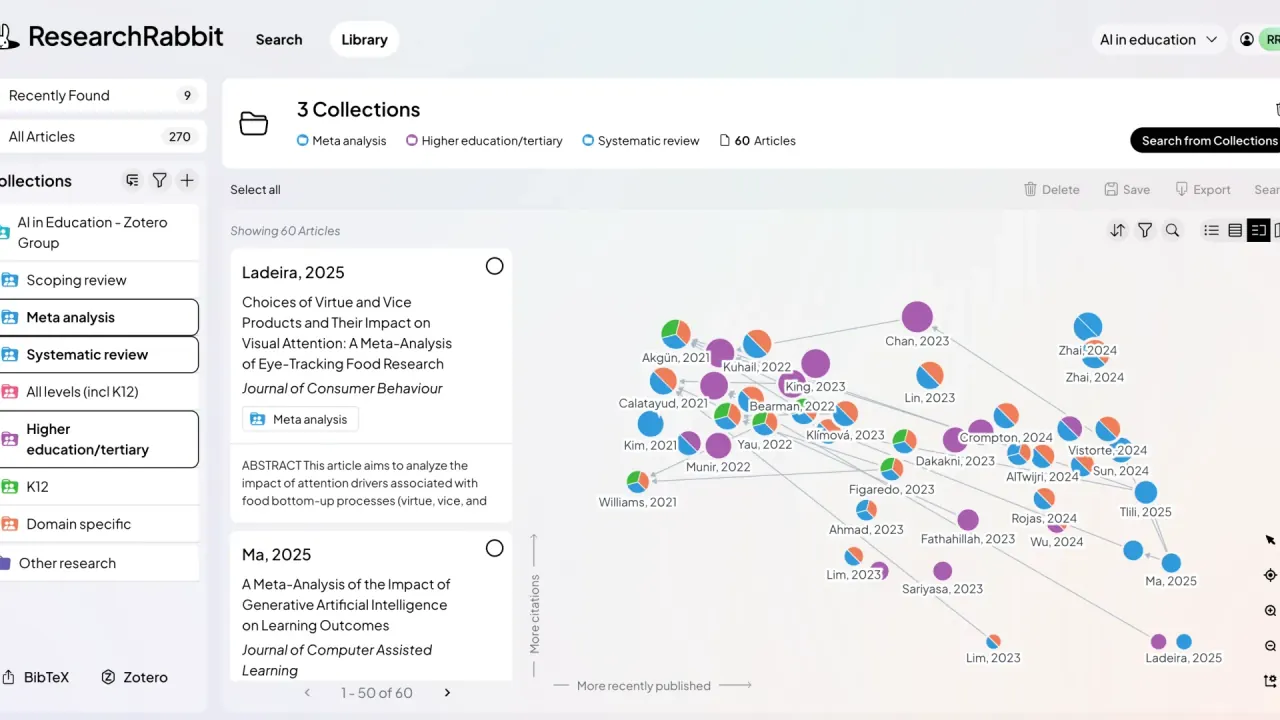
ResearchRabbit interface preview
ResearchRabbit logo

ResearchRabbit

ResearchRabbit turns a few seed papers into ranked recommendations and citation maps of connected research. The free tier allows up to 50 seed articles per search, and RR+ adds advanced filters for larger literature reviews.

ResearchEducation#Search#Visualization#research paper tool
Try for Free
Saves
Visits
Views
Pricing
Freemium
Published
Oct 3, 2026
Domain
researchrabbit.ai
Community rating

Used this tool? Rate it

Rate this tool

ResearchRabbit Product Information

Try for Free
Tool Information
Saves
Visits
Views
Pricing
Freemium
Published
Oct 3, 2026
Domain
researchrabbit.ai
Community rating

Used this tool? Rate it

Rate this tool

Featured Tools

Related Tools

Try for Free

What is ResearchRabbit?

ResearchRabbit is a browser-based literature review tool that starts from papers you already trust and recommends connected research by following citations, references and author links. In the company's words, ResearchRabbit analyzes papers you love and finds the research you’ve been missing.

It is a discovery and citation mapping engine rather than a writing assistant. The company says ResearchRabbit does not use large language models to power its core recommendation algorithms.

Its current terms of service are issued by Litmap Limited, which does business as Litmaps and is registered in New Zealand. The site footer carries the notice “Copyright © Litmap Limited. 2016-2026. All rights reserved.” When the redesigned version was announced, the company credited the change to its partnership with Litmaps, saying it would bring millions of new articles and smarter searches.

The company says ResearchRabbit is trusted by 1,000,000+ researchers worldwide. It has a free tier and a paid tier called RR+ (ResearchRabbit+).

Core features

Seed papers and iterative search

Using one or more input articles, ResearchRabbit searches the local network of citations, which covers all the citations and references of those starting articles.

Searches grow in steps, because ResearchRabbit uses the articles you select to learn and improve the quality of its recommendations.

Connections are mostly citation links, shared references and shared authors, but ResearchRabbit sometimes infers a connection from the semantic similarity of titles and abstracts. Basic search settings decide where candidates come from: all types of connection to the seeds, only the references of the seeds, or only their citations. The same logic applies when the search is for authors instead of papers.

Citation maps and result lists

Results appear as a ranked list and on an interactive citation map. By default the best 20 articles are shown on the map and on the first results page, and you can change that to 10, 20 or 40 articles. Beyond single maps, ResearchRabbit lets you place papers on a timeline, trace how ideas rise and identify key authors in a field.

Keyword search

Keyword search accepts the boolean operators AND, OR and NOT, plus quotation marks for exact-phrase matches. The company says ResearchRabbit's keyword search uses the Google Scholar search engine, so its results should match what you would see in Google Scholar.

Library, collections and sharing

  • Recently Found: a holding area for every paper you used as a seed or explored without saving, so you can browse first and organize later.
  • Collections and subcollections: nested folders for papers you decide to keep, with notes, stickers and colors for personal organization.
  • Sharing: collections can be shared by invitation, with each collaborator set as an Editor or a Viewer, or through a public link that lets anyone with it view the collection.

Shared collections had been missing since the new ResearchRabbit launched in October 2025 and were later brought back as part of the free tier.

Import and export

A Zotero Importer brings papers saved in linked Zotero collections into your ResearchRabbit library. Selected papers can be exported as BibTeX, RIS or CSV files, including papers drawn from several collections at once.

What RR+ adds

The RR+ plan raises the seed limit to 300 articles and adds advanced search controls, multiple projects, Signals alerts and faster support responses. The advanced filters cover keywords, publication date, journal quality through quartiles and journal h-index, open-access PDFs, and retraction status. ResearchRabbit has partnered with Signals, a service that looks for high-risk papers based on their citation behavior and citation network, and its warnings appear inside RR+ in your collections and new searches.

Where the paper data comes from

The database covers 310+ million articles across disciplines, drawn mainly from Semantic Scholar, OpenAlex and Crossref. It includes both open-access and closed-access articles. The company says it updates the database weekly and prioritizes the most recent, highest-cited versions of articles.

Guide

A ResearchRabbit search can start from keywords, a DOI, an existing collection or an imported file.

Starting a search

  1. From keywords: type keywords and press Enter, then select the relevant results so they become the seed articles for your search.
  2. From a DOI: enter the DOI, open the popup view of the article and click the “Similar” button to search for similar articles.
  3. From a collection: choose a collection from the Browse Library dropdown, and every article in that collection is added as a seed.
  4. From a file: export a BibTeX file from Zotero, Mendeley, EndNote or another reference manager and drag it onto the search bar, then choose which articles to import as seeds.

Growing and finishing a search

  1. Tick the articles that look useful; they queue up in the right-hand column as you select them.
  2. Click Search to run the next step, where your selected articles become the new seeds.
  3. If results drift off topic, add more relevant seeds, remove unrelated ones, or narrow the search with RR+ filters.
  4. When you are done, close the search with the X button in the navigation controls, which gives you a chance to save what you found into collections.

ResearchRabbit use cases and examples

The company positions the tool as a complement: ResearchRabbit is designed to work with traditional library resources, not replace them. Library databases stay the place for structured keyword searching and full text; ResearchRabbit finds related work that keywords miss.

  • Expanding a literature review: start from a handful of papers found in a library database, then follow earlier, later and similar work to see which studies keep appearing.
  • Tracing the roots of a field: one documented teaching exercise gives students two or three recently published papers and asks them to trace the foundational literature behind them with ResearchRabbit.
  • Finding a research gap: for dissertation students still shaping a research question, a supervisor can share a starter collection of 10 to 15 key papers and ask them to look for what has not been studied yet.

Who is it for

ResearchRabbit fits people who learn a field by following citation trails rather than by writing long keyword queries.

  • Students and early-career researchers: the free tier covers the core workflow, and the company itself says you can still do excellent research with the free version, even if it may take a little longer.
  • Researchers running large reviews: for reviews of 100+ articles, RR+ is pitched as a safety net when manual checks become unwieldy, using as many as 300 articles in a single search.
  • Researchers working on several papers: RR+ allows multiple projects, separating articles, collections and notes for each paper.
  • Educators and librarians: teaching materials, demonstration libraries and shared collections support classroom and supervision use.

It is a weaker fit as the main engine of a systematic review. A university library evaluation judged the tool best suited for inspiration rather than systematic evidence searching. It is also not open to anyone under 18, and the terms restrict commercial use without the company's approval.

Platforms

  • Web app: ResearchRabbit runs in the browser, with sign-up and login on the main site.
  • Interface language: ResearchRabbit does not yet offer native language support, so the company recommends the browser's built-in translation, which works across the whole app.
  • Mobile browsers: the translation instructions cover Safari on Mac and also on iPhone or iPad.
  • Search language: search quality varies by language, with English having the richest coverage, followed by Spanish, Portuguese, French and German.
  • Institutions: the Institution plan adds integration with a research library through LibKey, management of thousands of users and usage statistics.

Pricing

ResearchRabbit pricing has three levels, and the paid RR+ price depends on your country.

PlanListed priceSeed articles per searchMain inclusions
Free$0Up to 50Unlimited searches and collections, sharing, Zotero importer, BibTeX import and export
RR+$10 per month on the annual plan; $12.5 per month on the monthly planUp to 300Advanced search controls, multiple projects, Signals alerts, faster support responses
InstitutionOn requestNot statedEverything in RR+, volume discounts, LibKey integration, user management, usage statistics, dedicated support

The free tier is described as complete enough for a literature review, including unlimited search, unlimited collections, collaboration, library uploads and up to 50 seed articles per search. Signing up for it needs no credit card.

The plan card lists RR+ at $10 per month on the annual plan and $12.5 per month on the monthly plan. The help center gives the totals as $12.50 USD per month, or $120 USD per year, a saving of 20%. The pricing FAQ, by contrast, gives USD$10 per month as the default RR+ price for the U.S., UK, Canada and other countries. It describes RR+ as a premium subscription with monthly payments, with access continuing until the plan ends even after cancellation. The FAQ and the plan card therefore describe the $10 figure differently.

For 100+ countries, RR+ is discounted according to a country parity group. Eligible users see a discount code automatically when they upgrade in the app and apply it at checkout. Under the terms of service, all payments are in US dollars. Subscriptions renew automatically unless canceled. Cancellation takes effect at the end of the current paid term. The terms checked for this review contain no refund provision.

ResearchRabbit alternatives

  • Litmaps and Connected Papers: an independent librarian's review of the redesign calls ResearchRabbit a user-friendly entry to iterative citation chaining, while Litmaps still leads on advanced visualization and filter methods and Connected Papers remains the fastest and easiest single-seed map.
  • Free tier versus Litmaps Pro: the same review finds the free tier enough for most exploratory tasks and suggests Litmaps Pro may offer more value if you need journal-level filters.
  • citationchaser: for the most transparent systematic-review workflow, it names the free citationchaser as by far the most popular option.
  • Inciteful and Scite: a university library evaluation lists Connected Papers and Inciteful for citation network visualisation, and Scite for citation context analysis, as comparable tools.

Limitations

Coverage gaps

  • Open metadata only: ResearchRabbit can index only papers whose metadata is openly available, so articles without Open Access metadata, and their citations or references, cannot appear.
  • Different citation counts: citation and reference counts can differ from Google Scholar, which calculates them differently.
  • Indexing lag: a signed review in a library-technology publication reports that the discovery engine often lags in indexing recent publications compared with Google Scholar or Scopus.
  • Journal-article bias: the same review finds the tool heavily optimized for journal articles, frequently overlooking conference proceedings and technical reports that matter in fields such as computer science.
  • Author name splits: it also notes that variations in author names or institutional affiliations can split one researcher's work across several nodes.
  • Inconsistent size figures: most official pages cite 310+ million articles, while the help-center index still summarizes the database as 270+ million research articles.

Search control

  • Fixed ranking: result ranking is currently fixed and cannot be fine-tuned by users; filters only narrow which candidates qualify.
  • No boolean filters: boolean operators are not available inside the advanced keyword filters, which use a loose keyword match.
  • No two-way Zotero sync: the company says it is actively working on a two-way Zotero sync, and for now papers go back to Zotero through BibTeX export.

Independent assessments

A university library evaluation was first published in September 2025, before the October 2025 relaunch. It advised using ResearchRabbit as a springboard for exploration, not as a comprehensive or authoritative search tool, citing limited source transparency and replicability. It also found that search outcomes could vary with the input method, title or DOI, which affects replicability.

Terms of use

  • Age: the service is for users aged 18 or older, and people under 18 may not use or register for it.
  • Commercial use: the terms say the service may not be used in connection with any commercial endeavors unless specifically endorsed or approved by the company.
  • Your data: although the company performs routine backups, users remain solely responsible for the data they transmit, and the terms exclude liability for data loss or corruption.

Privacy and data rights

  • No training on your work: the company says it does not train AI models on your articles or notes.
  • No sale of research data: it also says it does not sell or expose your articles and notes to third parties.
  • Third-party AI providers: the privacy notice says its AI Products run through third-party providers, including Databricks and OpenAI, and that input, output and personal information is shared with them to deliver those products. The subprocessor list checked for this review does not name either company.
  • Data location: the privacy notice says ResearchRabbit's servers are located in the United States.
  • Processors: listed subprocessors include Amazon Web Services for cloud hosting and data storage. Mixpanel is listed for product analytics.
  • Deletion: on request, accounts and their information are deactivated or deleted from active databases, though some information may be kept for fraud prevention, troubleshooting or legal compliance.
  • Shared notes: anyone you share a collection with can see your notes, and its subcollections are shared as well.
  • Ownership: the terms state that users retain full ownership of their Contributions.

FAQ

Q1. Is ResearchRabbit free?

Yes. The free tier has no time limit and allows up to 50 seed articles per search; RR+ is optional.

Q2. Is ResearchRabbit part of Litmaps?

The terms of service name Litmap Limited, doing business as Litmaps, as the company that operates the ResearchRabbit website, and the redesigned version was announced as the result of a partnership with Litmaps.

Q3. Does ResearchRabbit use ChatGPT or another large language model?

Its core recommendations come from citation and authorship networks, not from a large language model. Separately, the privacy notice lists Databricks and OpenAI as providers for its AI Products.

Q4. Can ResearchRabbit replace database searching in a systematic review?

Not by its own description. The company calls it a complement to library databases, and the library reviewers cited above advise using it alongside systematic searching.

Know a Similar Tool?
If you know other great AI tools, feel free to submit them to us