
Toolso.AI
Toolso.AI
All ToolsCategoriesTrendingLatest ToolsPricingBlog
Toolso.AI
Toolso.AI
Toolso.AI
Toolso.AI

Discover the best AI tools to boost your productivity

GitHubGitHubTwitterX (Twitter)YouTubeYouTubeTikTokEmail

Popular Categories

  • AI Writing
  • AI Image
  • AI Video
  • AI Coding
  • More Categories

Explore

  • Latest Tools
  • Popular Tools
  • More Tools
  • Submit Tool
  • Pricing

About

  • About Us
  • Contact
  • Blog
  • Changelog

Legal

  • Cookie Policy
  • Privacy Policy
  • Terms of Service
  • Refund Policy
© 2026 Toolso.AI All Rights Reserved
Limited timeLimited-time offerFeatured Listing24h priority review · No backlink · 30 days featured$29.90then $59.90Price rises to $59.90 after Oct 31Ends in--:--:--Submit now
  1. Home
  2. All Tools
  3. Image Editing
  4. Removal
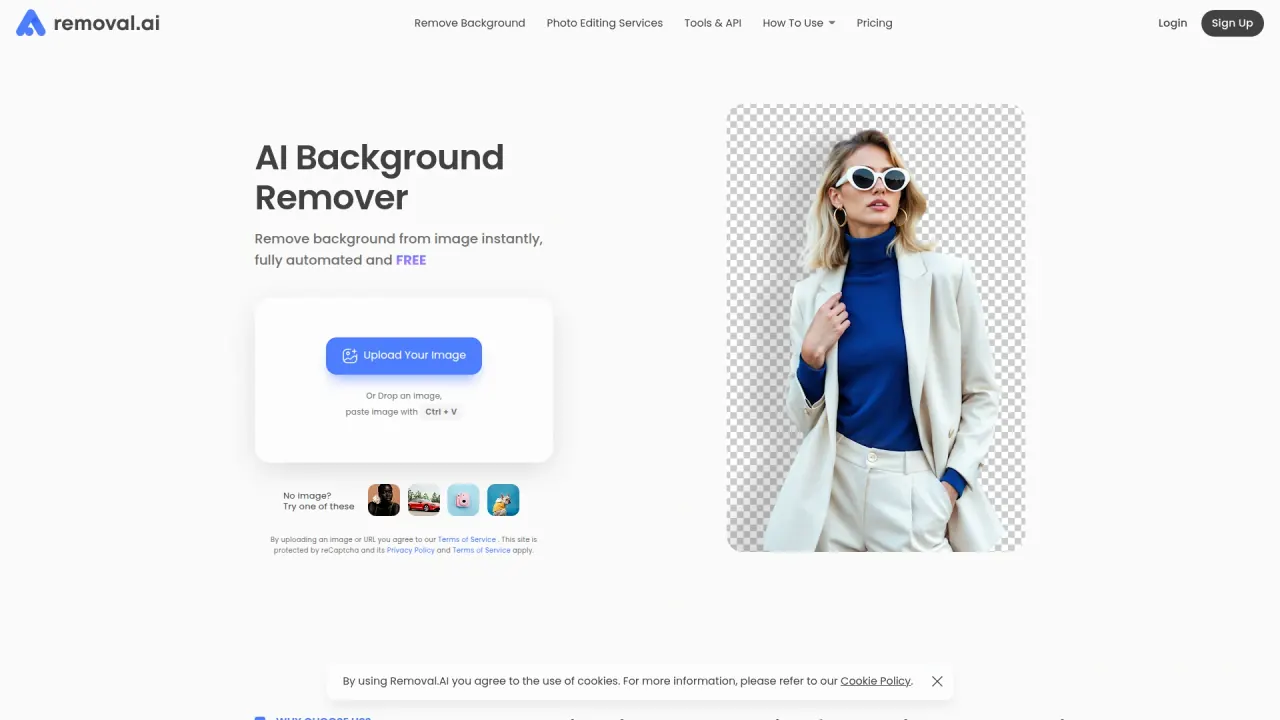
Removal interface preview
Removal logo

Removal

Removal cuts subjects out of JPG and PNG photos in the browser, with free low-resolution previews, credit-based HD downloads, a bulk uploader, desktop apps and a REST API for product and design workflows.

Image EditingDeveloper ToolsAI Photo Editing & Design#Batch Processing#Transparent Background#Background Replacement
View Pricing
Saves
Visits
Views
Pricing
Paid
Published
Sep 28, 2026
Domain
removal.ai
Community rating

Used this tool? Rate it

Rate this tool

Removal Product Information

View Pricing
Tool Information
Saves
Visits
Views
Pricing
Paid
Published
Sep 28, 2026
Domain
removal.ai
Community rating

Used this tool? Rate it

Rate this tool

Featured Tools

Related Tools

View Pricing

What is Removal?

Removal (branded Removal.AI on its official site) is a web-based AI background remover: you upload a photo, the service detects the subject and returns a cutout on a transparent, white or custom background. The vendor describes it as removing backgrounds instantly, fully automated and free.

The company calls itself an emerging online image background remover and photo editor software company, and its terms define the platform as a web-based photo editing application. Around the core uploader sit a free browser editor, an online bulk uploader, desktop apps for Mac and Windows, a Figma plugin and a REST API, all tied to one account and one credit balance.

The free tier is the first thing to understand. Anyone can process images without an account and download low-resolution results; full-resolution downloads cost credits, sold as packs valid for three years or as monthly subscriptions. Several official pages disagree on pack sizes, plugin support and commercial use, and those conflicts appear below in the sections they affect.

Core features

Automatic cutouts

  • Subject detection: Removal detects the subject automatically and delivers it on a white, customized or transparent background in 3 seconds or less, according to the vendor.
  • Edge handling: the vendor claims neat, smooth cutout edges and says hair and furry edges can be processed.
  • Output files: the web tool delivers a PNG with a transparent background, while the desktop tool can export either PNG or JPG.

Free photo editor

  • Background replacement: a finished cutout opens in a free browser editor where you can add a new background image, change the background colour or touch up the edges.
  • Design layers: text, shadow effects and a different background colour or image can be added on top of the cutout.
  • Manual eraser: when the AI result leaves stray background, an eraser with adjustable brush size and opacity lets you clean it up by hand.

Batch processing

  • Online bulk background remover: a separate browser tool accepts JPG, PNG and WebP files of 20 MB or less, with up to 100 images per upload.
  • Upload size ceiling: each bulk upload is also capped at 200 MB in total, on top of the per-upload image count limit.
  • Desktop folders: the Mac and Windows app processes a whole folder of more than 1,000 images in a single run without uploading them one by one.
  • Desktop controls: processing can be paused with "stop" and resumed with "start", and a background colour can be set from a picker or a hex code.

The batch routes are not interchangeable. The standard web uploader handles one image at a time and only takes JPG and PNG; the bulk uploader adds WebP and larger files but caps the number of images per upload and charges a different credit rate; the desktop app takes the largest folders but still sends every image to Removal's servers for processing.

Human editing

Images that automation handles poorly, such as fine hair, transparency, reflections or unusual lighting, can be sent to a paid manual service where a person handles the clipping path, masking and retouching by hand. The homepage advertises a 24-hour turnaround for images handled by these professional editors.

Guide

Removing a single background

  1. Upload, drop or paste (Ctrl + V) a JPG or PNG on the homepage or upload page; no account is needed to see the result.
  2. Review the preview, which can be downloaded free at low resolution.
  3. To edit further, click the Edit button in the right corner of the result dialog to open the photo editor.
  4. Spend one credit on the full-resolution download, and save it before leaving the page.

Processing a batch online

  1. Log in to the Bulk Background Remover and drag in files or a whole folder.
  2. Wait, or close the page or browser while the images are processed.
  3. Download the results one by one or as a complete folder once they are ready.

A queued image can still be cancelled, but once processing has started it can no longer be stopped.

Connecting the desktop app or API

  1. Log in and copy your API key from the account dashboard; the same key works for the API and the desktop app.
  2. In the desktop app, paste the API token and save it to activate the bulk uploader.
  3. For API calls, include the key in the Rm-Token header of every request.

Use cases and examples

  • E-commerce catalogs: Removal is pitched at product photos, with clean cutouts that highlight the product and handling for large photo volumes.
  • Marketplace listings: the desktop app has an "Optimize images for Ecommerce" option for product photos and a "Keep only the object" setting that crops results automatically.
  • Social posts and banners: the editor's canvas presets cover Facebook covers and wall posts, Instagram posts, Pinterest, and Shopify product and banner sizes.
  • Design work in Figma: the Figma plugin brings background removal directly into a Figma workflow instead of a separate upload step.

Who is it for

Good fit

  • Occasional users: the vendor recommends lifetime credits for people who only need background removal from time to time, and free previews let them check quality first.
  • Stores and studios with steady volume: monthly plans are recommended for businesses with a stable number of images each month, since unused credits roll over while the subscription stays active.
  • Developers: the vendor says the remover can be integrated into your applications, and the API shares the same credit balance as the web and desktop tools.
  • Very high-volume teams: organisations processing 10,000 or more images a month are directed to custom plans instead of the public price list.
  • Start-ups with unpredictable volume: the vendor positions its unlimited plan for start-ups that find it hard to estimate how many images they will process each month.

Poorer fit

  • Phone-first users: there is no native mobile app, only the mobile browser.
  • Commercial users relying on free downloads: the terms contain contradictory wording on commercial use, and the free tier is described as being for personal uses.
  • Photoshop-centred teams: official pages disagree on whether a Photoshop plugin exists.
  • Teams needing non-English support: support is offered in English only.

Platforms

  • Web: the uploader, editor and bulk uploader run in the browser.
  • Mobile: there is no mobile app yet, but Removal works in any mobile browser on phones and tablets without installation.
  • Desktop: the app runs on macOS 10.10 or newer and on Windows 7, 8 or 10, all 64-bit.
  • Server processing: desktop and web both process images on Removal's servers, so the desktop app also needs an internet connection.
  • Design tools: a Figma plugin is available, and for Photoshop or other tools the help centre points users to the REST API.
  • Languages: the website and tools are available in English, Spanish, French, German, Japanese, Chinese, Indonesian and Hindi, while customer support is offered in English only.

The pricing page adds "Removal.AI for Adobe Photoshop" and "API and Apps for Windows/Mac/Linux" to its feature list. Those two items conflict with the help centre, which routes Photoshop users to the API and lists only macOS and Windows installers.

Background removal API

  • Inputs and outputs: the background removal API accepts direct uploads or image URLs and returns either a file URL or Base64-encoded data.
  • Resolution cap: API images can be up to 25 megapixels, lower than the 36 megapixels the web tool allows.
  • Rate limits: throughput scales with image size, from 500 images per minute at 1 megapixel down to 20 images per minute at 25 megapixels.
  • Real-world throughput: the documentation calls 500 per minute a theoretical figure and says actual rates depend heavily on image resolution and internet speed.
  • Code samples: examples are provided for Python, PHP, C#, JavaScript and Node.js.
  • Reliability claims: the vendor advertises a 99% uptime guarantee and GDPR-compliant file storage; these are vendor statements, not independently verified figures.

Pricing

Removal is free for low-resolution images of 0.25 megapixels and for personal uses. Without an account you get a preview and can download low-resolution results for any number of images. Signing up adds one free credit for a single high-resolution download. After that, each high-resolution download costs one credit.

OptionPrice rangeCreditsPer-image rateBilling and validity
FreeNo chargeNoneFreeLow-resolution downloads only
Lifetime packs$1.89–$1,4993–13,000$0.63–$0.11One-time payment, credits usable within 3 years
Monthly plans$5.99–$1,650 per month100–90,000$0.05–$0.01Renews monthly, cancel any time
High-VolumeCustom quote10,000+ images a monthCustomFlexible credit and API rate limits

Monthly credits roll over up to 5x the monthly budget and remain valid only while the subscription is active. Credits work the same way across the web tool, the desktop app and the API, so there is no separate API balance. The bulk uploader charges a flat 0.5 credit per image and deducts credits as soon as images are queued, while API accounts get 10 free preview credits per month by default. API preview calls return lower-resolution results and do not use paid credits. Subscribers on 7,500 or more credits a month pay only for images that meet their required quality level.

The help-centre FAQ gives different figures from the pricing table: it lists $1.89 for a single credit, $1,499 for 8,000 credits and $5.99 for 40 monthly credits, whereas the pricing page lists 3, 13,000 and 100 credits for those prices.

Beyond the listed tiers, the pricing page offers an unlimited plan by quote, described as unlimited credits with HD downloads without limits; no public price is shown for it.

Refunds and cancellation

  • Money-back guarantee: a refund within 14 days requires a first-time purchase, fewer than 50 processed images at any resolution and no earlier use of the policy by the account, person or company.
  • Guarantee wording: the pricing page summarises the same guarantee as restricted to 50 downloads, while the refund policy counts fewer than 50 processed images at any resolution.
  • Excluded purchases: purchases made with special coupons, customized subscriptions or offers, and manual-service purchases are not covered by the guarantee.
  • Response time: the refund policy promises a reply within 48 to 72 hours, while the help-centre FAQ says 24 to 48 hours.
  • Payment methods: credit card and PayPal are accepted for both subscriptions and lifetime packs.
  • Cancellation: subscriptions can be cancelled from Settings in the account at any time, but rolled-over credits stop accumulating after cancellation.
  • Failed images: if processing fails, or a queued item is deleted before it finishes, the credit is returned automatically.

Removal alternatives

  • remove.bg: its bulk editing handles up to 500 images per minute, and it lists integrations with Figma, Photoshop and Zapier. It also offers a mobile app, which Removal does not.
  • Photoroom: it positions Batch and its API for removing backgrounds across entire e-commerce catalogs and marketplace listings.
  • Removal's own manual service: for images automation cannot handle, a human editor is the in-house alternative to switching tools.

The main reasons to look elsewhere are a native phone app, which the help centre says does not exist yet, and a Photoshop integration, for which the help centre points users to the API instead. The main reasons to stay are the free low-resolution preview, lifetime credits and one balance shared by web, desktop and API.

Limitations

Usage and output limits

  • File types on the web: the web tool accepts only JPG and PNG files up to 12 MB each.
  • Resolution ceiling: web uploads above 36 megapixels are resized down to that maximum before processing.
  • Difficult edges: when hair, fur, glass or a soft edge comes out wrong, the suggested fixes are manual refinement in the editor or a higher-resolution version of the photo.
  • Commercial-use wording: clause 2.1 of the terms allows commercial and non-commercial use, then states that results must be used only privately and excludes direct and indirect commercial use.
  • Upload rights: users are responsible for securing the rights to any photo they upload.
  • No outcome warranty: the operator is not responsible for speed, availability, data loss or accuracy of results.
  • Account restrictions: the operator reserves the right to restrict use of the platform or block specific users without giving a reason.
  • Governing law: disputes are governed exclusively by the laws of Vietnam.
  • Refund scope: purchases outside the 14-day guarantee are generally non-refundable.

Privacy and image retention

  • One-hour deletion: uploaded images and their results are deleted within an hour of upload, so a result must be downloaded before you leave the page.
  • Seven-day bulk storage: bulk uploader originals and results are kept for 7 days and then deleted permanently.
  • Shared links: bulk downloads require sign-in, but anyone can open an image once its download link is shared.
  • No third-party sharing: uploaded and processed images are not shared with third parties.
  • Encrypted transfer: images travel over SSL/TLS and are used only for background removal.
  • Server logs: logs are kept for up to three months and contain no image data.
  • Analytics: Google Analytics cookie data is received and stored on a Google server in the USA.
  • IP addresses: by accessing the platform, users agree that the operator may store their IP address to verify broad use of the service.
  • Model training: the privacy policy does not mention whether uploads are used to train models. The bulk uploader page states that images are never used for anything other than removing the background, while the enterprise offer lets clients submit images to train their own AI.

FAQ

Q1. Is Removal free to use?

Yes for low-resolution results: previews and 0.25-megapixel downloads are free with no image limit. Full-resolution downloads need credits, and one free credit is given at sign-up.

Q2. Is there a Removal app for phones?

No. There is no mobile app yet, but the website works in mobile browsers. Desktop apps exist for macOS and Windows.

Q3. Do API calls use separate credits?

No. The API uses the same credit balance as the web and desktop tools. Each account also gets 10 free preview credits per month for lower-resolution test calls.

Q4. How long does Removal keep my images?

Single uploads and their results are deleted within one hour. Images in the bulk uploader are kept for 7 days and then permanently deleted.

Q5. Can I get a refund on credits?

First-time purchases qualify for a 14-day money-back guarantee if fewer than 50 images were processed and the policy has not been used before. Coupon, customized and manual-service purchases are excluded.

Know a Similar Tool?
If you know other great AI tools, feel free to submit them to us