
Toolso.AI
Toolso.AI
All ToolsCategoriesTrendingLatest ToolsPricingBlog
Toolso.AI
Toolso.AI
Toolso.AI
Toolso.AI

Discover the best AI tools to boost your productivity

GitHubGitHubTwitterX (Twitter)YouTubeYouTubeTikTokEmail

Popular Categories

  • AI Writing
  • AI Image
  • AI Video
  • AI Coding
  • More Categories

Explore

  • Latest Tools
  • Popular Tools
  • More Tools
  • Submit Tool
  • Pricing

About

  • About Us
  • Contact
  • Blog
  • Changelog

Legal

  • Cookie Policy
  • Privacy Policy
  • Terms of Service
  • Refund Policy
© 2026 Toolso.AI All Rights Reserved
Limited timeLimited-time offerFeatured Listing24h priority review · No backlink · 30 days featured$29.90then $59.90Price rises to $59.90 after Oct 31Ends in--:--:--Submit now
  1. Home
  2. All Tools
  3. Business Tools
  4. Presentations.AI
Presentations.AI interface preview
Presentations.AI logo

Presentations.AI

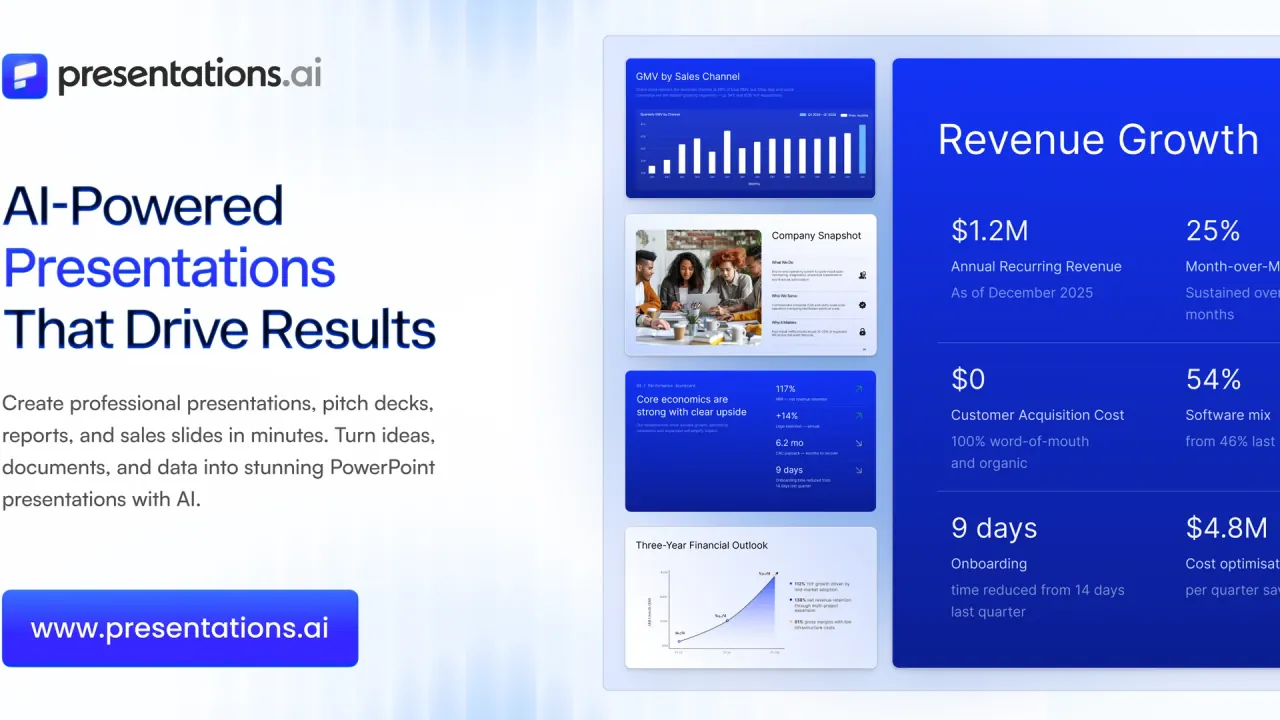
Presentations.AI turns a prompt, a Word file, a PDF, a URL or an Excel sheet into a branded slide deck, then exports it as an editable .pptx or PDF. Paid tiers add Brand Sync assets, data-connected Refresh and an API for generating decks at scale.

Business ToolsPresentationPPT Tool#Pitch Deck#AI Presentation#Brand Style
Try for Free
Saves
Visits
Views
Pricing
Freemium
Published
Sep 22, 2026
Domain
presentations.ai
Community rating

Used this tool? Rate it

Rate this tool

Presentations.AI Product Information

Try for Free
Tool Information
Saves
Visits
Views
Pricing
Freemium
Published
Sep 22, 2026
Domain
presentations.ai
Community rating

Used this tool? Rate it

Rate this tool

Featured Tools

Related Tools

Try for Free

What is Presentations.AI?

Presentations.AI is an AI presentation platform that turns ideas, documents, and URLs into professional slide decks in minutes. It runs in the browser with companion apps for iPhone and Android, and targets business decks such as sales proposals, investor pitches and recurring reports.

The company says it is headquartered in Singapore, while its data processing agreement and both app-store listings name Slide Craft Technologies Pvt Ltd, an Indian company with a Bengaluru address, as the entity that provides and publishes the service. Its own site says it was founded in 2018; a February 2025 independent report on its seed round gives 2019. The founding team is named as Sumanth Raghavendra, Dhruv Saxena, Biju Abraham, Ravi Kasthuri, Saravanan Govindaraj and Ezhilkumar, and the site describes a 30-person team.

Scale figures come from the company. It currently claims more than 12 million business users. In February 2025 it told an independent reporter the figure was over 5 million users since its 2023 public beta, when it also announced a $3 million seed round led by Accel. Both are vendor statements, not audited counts.

The name is generic, and app stores list similarly named slide generators from unrelated publishers; this page covers only the product at presentations.ai.

What matters before signing up: the free Starter tier is small (100 credits, decks of up to 20 slides), the Gold price differs between the company's own pages, paid plans are shown as annual billing, and the terms say fees are non-refundable.

Core features

Every entry point runs on the same generation engine; they differ in what you start from and how much structure is preset.

Inputs and entry points

  • Many source formats: Presentations.AI can build a deck from a text prompt, a Word document, a PDF, a URL, a Google Doc, or an Excel file.
  • AI Slide Creator: drafts one slide at a time while you drag, drop and refine each slide by hand.
  • Pitch deck generator: a pitch-focused variant preloaded with the slide order investors expect — problem, solution, market, traction and the ask.
  • ChatGPT for Presentations: paste a prompt or an existing ChatGPT conversation and get a finished, on-brand deck.
  • Converters: PDF to PPT, Text to PPT, Word to PPT, Link to PPT and Outline to PPT are shortcuts for a specific starting format. The PDF converter also handles scanned and password-protected PDFs.
  • Text to PPT settings: you choose the slide count, language, and target audience, and the AI structures the content into a complete, editable presentation in about 30 seconds.

Design, branding and templates

  • Brand Sync: paste your website URL and the proprietary Brand Sync capability pulls your logo, fonts and colors onto every slide.
  • Template library: 1000+ full-deck templates built for specific jobs such as sales, board meetings and product launches, plus single-slide layouts for gaps like a timeline or comparison slide.
  • Reflowing layouts: layouts adapt automatically as you edit, so adding a paragraph, swapping an image, or removing a bullet reflows the slide instead of breaking it.
  • Languages: deck creation is supported in more than 14 languages.

Refresh, data and automation

  • Refresh (Gold only in the comparison table): a master deck is connected to Salesforce, HubSpot, Google Sheets, Tableau, Looker, Databox, Mixpanel, PostgreSQL, MySQL, Snowflake, and 50+ more, and updated on a daily, weekly or monthly schedule.
  • Programmatic generation: no-code triggers via Zapier or Make, or a REST API and webhooks with code; a white-label option shows your brand instead of Presentations.AI's.
  • API output: the API returns a deck as PPTX, PDF or a shareable web link, and the API page advertises a free tier of 10 presentations per month with no credit card.

Export and collaboration

  • PowerPoint export: a fully editable .pptx that the company says opens in PowerPoint or Google Slides with nothing moved or broken; PDF is offered alongside it.
  • Image files: decks made through the ChatGPT plugin can be downloaded as PowerPoint (.pptx), PDF or image files.
  • Real-time collaboration: team members edit, comment on and review the same deck together.

The models underneath are only partly disclosed. In the February 2025 report the chief executive said the product combines frontier large language models with its own small language models for narrow tasks such as picking a chart type, and uses the Flux and Stable Diffusion text-to-image models for slide images. The terms say the service may rely on publicly available third-party AI platforms and models, and that the company has no control over them.

Guide

Presentations.AI works in three steps: you provide an input, the AI builds a structured deck, and you refine and export it. In practice the flow looks like this:

  1. Pick the entry point that matches your material — a topic, notes, a PDF or Word report, or a web page.
  2. For Text to PPT, set the slide count, language and target audience before generating.
  3. Add your website URL once so Brand Sync applies your logo, fonts and colors to the draft.
  4. Edit the draft slide by slide; every element, including layout, colors, fonts and imagery, can be overridden without regenerating the deck.
  5. Export to .pptx or PDF; the file opens in PowerPoint or Google Slides.

The Chrome extension shortens step 1 for web content: install it, open the article or report you want, click the toolbar button, and the extension captures the page content and generates a structured slide outline automatically.

Use cases and examples

The use cases the company names cluster around decks that are rebuilt again and again:

  • Founders: investor pitch decks with financial projections and traction data kept current for each fundraising meeting.
  • Sales: a personalized proposal per prospect, with CRM-connected pricing and deal data.
  • Product teams: roadmap slides synced to project data so launch decks do not show stale timelines.
  • Customer success: client usage data connected to a QBR deck so charts update automatically, or API-generated renewal decks for long-tail accounts.
  • Marketing: campaign results and content briefs turned into on-brand stakeholder updates.

For investor material, the company's own guidance is to always review and customize AI-generated investor materials before sharing them externally. That caveat matters because the pitch workflow supplies structure and phrasing, not validated numbers.

Who is it for

Presentations.AI is used by anyone who needs to turn ideas into decisions through presentations, including founders, sales teams, marketers, product managers, consultants, customer success teams, and enterprise teams. It fits best when three conditions hold:

  • PowerPoint is the destination: the product is built around editable .pptx output.
  • You rebuild the same deck repeatedly: Refresh, templates and the API pay off on weekly reports, QBRs and proposals.
  • You have brand rules to enforce: Brand Sync and shared brand assets suit teams whose decks drift off-brand.

It is a weaker fit if you want monthly billing without an annual commitment, since every paid tier on the pricing page is shown as billed annually. For larger organizations, the enterprise offer bundles central brand standards, data integration, single sign-on and audit trails over a typical 3 to 4 week implementation, longer for bigger companies.

Platforms

The main product is a web app that needs a modern browser. Around it sit several smaller entry points; store figures below come from a capture on September 21, 2026:

  • iPhone and iPad: an App Store app published by Slide Craft Technologies Private Limited, version 3.0.8, requiring iOS 13.0 or later, rated 4+, and showing no user ratings yet in the US store.
  • Android: a Google Play app from the same publisher with 50K+ downloads, rated Everyone; its developer-declared data-safety panel states no data shared with third parties and no data collected.
  • Chrome extension: converts the open web page into slides; the store listing shows 344 users, a 5.0 average from 8 ratings, and version 1.0 last updated June 19, 2025.
  • ChatGPT: a plugin lets you generate, review and export a deck without leaving ChatGPT.
  • Workspace links: native Google Drive and Notion integrations connect decks to source documents.

Pricing

Prices on the pricing page are US prices; your actual price might vary depending on your country to adjust for purchasing power parity. The page shows three self-serve tiers, all paid tiers billed annually:

PlanListed US priceAI creditsModels and speedNotable limits and unlocks
Starter$0100Standard models, medium speedUp to 20 slides
Pro$20 per month, $240 billed annually5,000Advanced models, fastHigh-quality PowerPoint export, presentation tracking and analytics, brand customization
Gold$50 per month, $600 billed annually25,000Frontier models, ultraAdvanced brand customization, shared knowledge base

The Gold row does not match the company's other pages. The homepage lists Gold at $100 per month billed annually with 50,000 credits, the FAQ also says 100 US dollars per month billed annually, and the pricing page's own structured data carries a $100 Gold price. The page does not display a month-to-month price for any tier.

Credit timing is also described two ways: the comparison table labels credits as the total available per billing cycle, while the homepage's structured data calls Pro's allowance 5,000 credits per month, billed annually.

Export and branding by tier

FeatureStarterProGold
PowerPoint / PDF exportChecked in comparison tableIncludedIncluded
Password-protected linksNot includedIncludedIncluded
GuestsUp to 5Up to 10Unlimited
Custom brand colors and fontsIncludedIncludedIncluded
Custom brand assetsNot included10 MBUnlimited storage
Custom templatesNot includedNot includedIncluded
Presentation Refresh and project knowledgeNot includedNot includedIncluded

Whether Starter can export to PowerPoint is inconsistent across pages. The comparison table marks PowerPoint/PDF export for all three tiers, but the Pro card lists high-quality PowerPoint export as a Pro feature and the FAQ says paid plans unlock PowerPoint export.

Mobile purchases follow different terms. The App Store description quotes 2,000 credits for individuals and 6,000 for teams on Pro, and says in-app subscriptions renew annually unless canceled 24 hours before the period ends.

Presentations.AI alternatives

The company positions itself against three products: it calls Gamma web-first and built for one-time presentations, Canva a general design tool, and Microsoft Copilot in PowerPoint unable to connect live data or generate decks at scale. That is a vendor's framing, not an independent comparison.

A third-party consumer review platform's "People also looked at" strip on the Presentations.AI page — a recommendation module, not a ranking — showed Gamma in a September 21, 2026 capture at 1.7 (124 reviews), Beautiful.ai at 2.8 (247), Prezi at 2.8 (636), Decktopus at 3.7 (58) and Genspark at 3.8 (420). A June 2026 roundup of eight AI presentation makers, which discloses affiliate commissions, picked Gamma, Canva, Beautiful.ai, Pitch, Chronicle, STORYD, Prezi and SlidesAI and did not include Presentations.AI.

Limitations

Output quality and export

  • Drafts, not final decks: the terms say AI results are intended to assist users in generating initial drafts and are provided as is, with no warranty of accuracy, completeness or truthfulness.
  • Filled-in content: if your input is short or vague, the AI may add structured content from general knowledge, which you can review and edit.
  • Export fidelity: the FAQ advises reviewing an exported file before a high-stakes meeting because different presentation environments handle certain elements in their own way.

Billing, cancellation and refunds

  • No refunds: the terms state there are no refunds for any products or services purchased and no credits for partially used subscriptions.
  • Cancellation window: subscriptions renew automatically; for direct purchases the terms ask you to cancel at least thirty days before the renewal date, or within thirty days of a renewal notice. The FAQ separately says you can cancel anytime from account settings. The two are not reconciled.
  • Account deletion: terminating the service may delete your content, and the terms say the company has no obligation to store your content.

What reviewers report

In a capture on September 21, 2026, Presentations.AI's claimed profile on a third-party consumer review platform averaged 1.5 from 37 reviews, with 86% one-star and 20 reviews in the last 12 months; the page noted the company had not replied to negative reviews. Most of the recent reviews shown describe billing rather than slide quality: annual renewals charged after little use, refunds refused or left under review for weeks, and credits offered instead of money. Three reviewers say a monthly price was displayed but a full year was charged. That is a small, self-selected sample with a directional signal only, but it lines up with the annual-only pricing and no-refund terms above.

Privacy and data rights

  • Ownership: the terms say the company does not claim ownership of your content, but you grant it a perpetual, irrevocable, worldwide license to use that content for operating and providing the service to you and other registered users.
  • Model training: the FAQ says your content is not used to train AI models. The privacy policy itself does not address model training.
  • Security claims: the company states SOC 2 Type II certification and GDPR compliance; both are vendor statements rather than independently verified findings.
  • Data location: the privacy policy says personal data may be transferred to the United States or elsewhere; the processing agreement lists Amazon Web Services for hosting customer data in the USA, plus Slack, Webflow, Stripe and Adobe as sub-processors.
  • Deletion after contract end: under the processing agreement, personal data is returned or deleted at least thirty days after the agreement ends.
  • Age: the service is not intended for children under 16.

FAQ

Q1. Is Presentations.AI free?

Yes, the Starter plan costs $0 and includes 100 credits and decks of up to 20 slides. Whether it includes PowerPoint export is described differently across the site.

Q2. How much does Gold cost?

The pricing page shows $50 per month billed annually ($600 per year) with 25,000 credits, while the homepage and FAQ show $100 per month billed annually.

Q3. Can I get a refund?

The terms say all fees are non-refundable and there are no refunds for partially used subscriptions.

Q4. Does Presentations.AI use my content to train AI?

The FAQ says no. The privacy policy does not address model training, and the terms grant the company a license to use your content to run the service.

Know a Similar Tool?
If you know other great AI tools, feel free to submit them to us