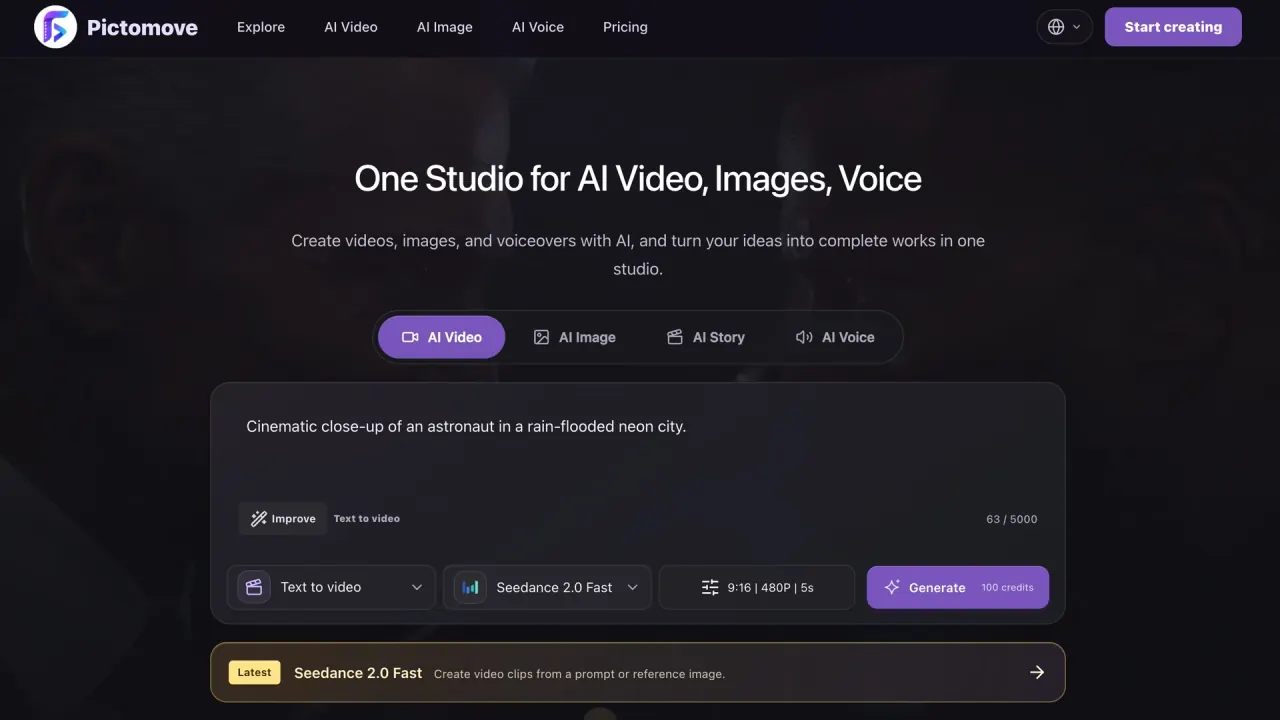

Build short AI videos, still images, and voiceovers from prompts or reference media in a browser-based creative workspace. Review settings, estimated credits, and outputs before you publish.
Used this tool? Rate it
Used this tool? Rate it
Pictomove is a browser-based AI creative workspace for making complete videos, individual video shots, images, and voiceovers from prompts, scripts, and permitted reference media. It brings video, image, and voice tasks into one Pictomove AI studio rather than treating each output type as a separate product.
A project can start from a written scene, a reference image, uploaded audio, or a script; the useful output may be a cutaway, product still, opening frame, or narration track rather than a finished film.
Its tools expose model, format, duration, quality, and audio choices for relevant generation modes. The workflow is about directing a short asset and reviewing it, not accepting an opaque one-click production.
For a small campaign, those units can be used independently: make a product image, animate it, and add narration only if the edit needs it. For a story sequence, the workspace can support a brief, several shots, and a later assembly pass.
Pictomove's AI video generator, image-to-video, text-and-reference image generation, and voice generation work in the same workspace, with model and settings choices shown in the relevant tools.
The text-to-video workspace asks for a scene description and exposes a model picker, aspect ratios, output quality, duration, and an optional sound setting where available. Its guidance frames a prompt as a shot specification: identify the subject, action, setting, and camera direction when that changes what the viewer should see. It is a better fit for a short clip with a clear job than for a long multi-action sequence.
Available ratios, durations, quality settings, and audio options vary by model and mode. A vertical social version and a landscape version should be treated as separate outputs. When label text, a face, thin objects, or a stable horizon matter, a short first render is a lower-risk way to assess the result before committing more credits.
Pictomove's AI image generator can start from a written description or an uploaded reference image. The current tool presents ratio selection and model-dependent reference controls for product visuals, thumbnails, posters, characters, and concept images.
A source image can guide appearance, composition, or a particular product, but the generated version still needs an inspection for shape, packaging, wording, crop, and other details before publication. For a sequence, keep repeatable visual decisions—lighting, framing, palette, or character description—stable across prompts.
The AI voice generator supports text input, voice selection, and reference-audio upload. Its current interface lists custom voice, voice design, and voice clone modes, a 5,000-character generation limit, mixed-language input support, and language filters for Chinese, English, Japanese, Korean, French, German, Spanish, Portuguese, and Russian.
Voice can be generated alongside visuals instead of being baked into every video attempt. Decide early whether sound belongs in a generated video shot or should be a dedicated voiceover, because that choice can affect the result and credit estimate.
The Video Agent offers a six-step flow: creative brief, director plan, cast and world, storyboard, generated scenes, and final cut. Its planning screen includes format, visual-style, aspect-ratio, duration, and language choices before the sequence is created. It is useful when a project needs related shots and a plan before generation costs begin, but it does not remove the need to assess whether the shots meet the brief and cut together coherently.
The text-to-video tool turns a described scene into a short video and exposes a model choice, credit estimate, and browser preview.
Use text-to-video when the first frame can be created from a written scene. Describe the subject, one action, setting, and a camera move only when it matters to the composition. A concise shot brief is easier to evaluate than a long prompt with many changes.
Use image-to-video when a supplied image must anchor the subject or composition. A product package, branded character, or layout with planned empty space is a strong starting use case. Use the image workspace when the priority is a still visual; a prompt can establish subject, surface, lighting, background, and aspect ratio.
Set the destination format before creating the first version. A vertical clip needs a subject that remains visible in a narrow frame, while a wide edit can accommodate lateral motion. Keep the first motion request modest: a single push, reveal, turn, or object movement gives a concrete result to assess. Separate several actions into individual shots for more control over framing and cut points.
The interface displays an estimate before a paid generation is confirmed. Read it again after changing the model, duration, resolution, audio option, output count, or other parameters, because credit use varies with those selections. Planning and review are described as free, while a paid generation shows its exact credit cost before confirmation.
Inspect more than the center of a still. Check logos, labels, hands, repeated objects, fine edges, and text at an appropriate size. For image-to-video, check opening, middle, and final frames for camera drift, changing faces, unexpected objects, or a final frame that is hard to cut around.
Compare the result with its destination: a thumbnail must remain clear at a small size, a social clip may need caption room, and a product demo may need a stable close view. Save the prompt and settings for versions that solve a concrete editing problem.
Prepare a script for the voice generator when narration needs to carry information that the visuals cannot. Choose the language and voice treatment for the audience, then listen for pronunciation, pacing, and tone. When reference audio is used, make sure the user has the rights and permissions to upload it.
Keeping narration separate from a video shot makes it possible to revise wording, language, or delivery without regenerating a visual that is already working.
Pictomove identifies narrative shorts, product ads, social videos, anime scenes, product images, and voiceover audio as the kinds of assets its workspace can create. The image-to-video workflow uses an uploaded starting image and a motion description to create a short video, with settings that can include a last frame, audio, or additional references depending on configuration.
For ecommerce or a launch page, start with the asset whose accuracy matters most. A product image can establish the object, surface, lighting, and background; a short image-to-video version can add a restrained camera move or reveal. This can help test visual direction, but packaging, labels, and product claims still need a human check before publication.
Short-form social work benefits from predictable framing, a readable focal point, and space for text or captions. Pictomove can create visual directions, a thumbnail, a cutaway, or a short motion treatment from the same campaign idea. For fiction or animation, the Video Agent adds a planning layer before scene generation; continuity and reference media still require review before publication.
Pictomove describes its audience as creators, marketers, and content teams. The pricing page positions Pro for solo creators, Business for teams, and Ultra for studios and agencies that need high-volume output.
Pictomove is a less direct fit when a project requires a guaranteed unique, legally cleared, error-free, or production-ready output without review. A conventional shoot, specialist editor, or workflow with formal approval and rights-clearance controls may be the better primary route. It is also not a way to bypass consent, copyright, privacy, publicity, or safety obligations.
Pictomove is presented as a web application that requires JavaScript and a modern web browser, so creation happens in the browser rather than through a desktop installation.
The public site exposes web entry points for AI video, AI image, AI voice, image-to-video, and Video Agent workflows. Users can choose a workflow, submit permitted inputs, review settings and estimates, then generate in the browser. The public pages do not establish a native desktop or mobile application as the access route, so buyers needing an installed or offline workflow should verify that requirement before purchase.
The current pricing page lists a $0 Free tier with 10 free credits and one concurrent generation; it excludes commercial licensing and watermark-free exports.
| Tier | Listed monthly price | Monthly credits | Concurrent generations | Decision boundary |
|---|---|---|---|---|
| Free | $0 | 10 free credits | 1 | A way to inspect selected image, video, and voice modes; commercial licensing and watermark-free exports are not included. |
| Pro | $19.99 | 2,000 | 4 | Positioned for solo creators working on images, short videos, and a limited number of premium clips. |
| Business | $49.99 | 6,000 | 8 | Positioned for teams running ads, storyboards, batch tests, and steady content output. |
| Ultra | $99.99 | 13,000 | 12 | Positioned for studios, agencies, and higher-volume output. |
The pricing page labels these as monthly prices and also advertises annual billing options. The current monthly pricing page lists Pro at $19.99 for 2,000 credits and four concurrent generations, Business at $49.99 for 6,000 credits and eight concurrent generations, and Ultra at $99.99 for 13,000 credits and 12 concurrent generations. Prices, credit costs, models, processing speed, output quality, and availability can change, so treat the live checkout and selected configuration as the decision point rather than relying on a historical estimate.
One credit balance is used across video, image, voice, and agent workflows. The price of a task varies with model, resolution, duration, audio settings, output count, and other displayed parameters. A still-image test can therefore be a practical way to check an art direction before choosing a higher-cost video configuration.
Subscription credits reset at each billing cycle and do not roll over unless a plan explicitly says otherwise. One-time credit packs are separate from subscription credits and remain available until used, unless otherwise stated or required by law. Paid plans include commercial use, subject to the terms, model-provider policies, and third-party rights. That is a plan entitlement, not blanket rights clearance.
Treat generated video, images, and voice as drafts that need human review for accuracy, legal clearance, brand safety, and suitability before they are published, sold, or used commercially.
Pictomove's terms warn that AI outputs can be inaccurate, offensive, incomplete, similar to other content, or unsuitable for the intended use. They do not guarantee that an output will be unique, error-free, legally safe, or commercially suitable. Treat a generated asset as a candidate, not automatic approval to publish it.
The platform depends on third-party models, hosting, storage, payment, and moderation providers. Its terms state that features, models, prices, credit costs, processing speed, output quality, and availability may change. Check the current interface and pricing details before committing to production.
Safety screening can stop a request before it enters the generation queue. The acceptable-use policy prohibits illegal, harmful, abusive, deceptive, or rights-infringing uses, including non-consensual impersonation or misleading deepfakes and attempts to bypass moderation. A prompt blocked before generation is not queued and does not consume credits.
Account eligibility is another practical boundary: the terms require a user to be at least 18 years old, or the age of legal majority in their jurisdiction. Users are responsible for submitted content, generated outputs, and the rights and permissions needed for uploads.
Purchases are generally final after payment, including unused credit packs and subscriptions, except where law requires otherwise or there is a confirmed billing error. Cancelling prevents future renewals but does not refund the current paid period. Platform-side failures may return account credits, not a refund.
Using the service means that prompts, uploads, references, generation settings, generated video, image, voice, and audio content, generation history, task IDs, output links, credit usage, and safety-review metadata may be processed as part of the product's functionality and account settings.
Pictomove states that it may route prompts, uploads, and references to AI model providers when a user requests a generation, and that it may share information with providers, storage services, and moderation services needed to process a request safely. Do not upload confidential client data, personal recordings, source media, or reference material unless the data handling and permissions are acceptable for that project.
The privacy policy says generated content is not used to train AI models without consent. That statement does not remove the need to assess retention, provider routing, account access, and the sensitivity of each prompt or upload. It says personal data is retained as necessary for service delivery, legal obligations, disputes, agreements, and business records before deletion or anonymization under its retention policies.
The terms say users retain the rights they already have in their user content and generated outputs, subject to the terms, applicable law, and third-party rights. Users grant Pictomove a limited license to process and store that material as needed to provide and support the service. Retain the original rights record and check the output before release.
