
Toolso.AI
Toolso.AI
All ToolsCategoriesTrendingLatest ToolsPricingBlog
Toolso.AI
Toolso.AI
Toolso.AI
Toolso.AI

Discover the best AI tools to boost your productivity

GitHubGitHubTwitterX (Twitter)YouTubeYouTubeTikTokEmail

Popular Categories

  • AI Writing
  • AI Image
  • AI Video
  • AI Coding
  • More Categories

Explore

  • Latest Tools
  • Popular Tools
  • More Tools
  • Submit Tool
  • Pricing

About

  • About Us
  • Contact
  • Blog
  • Changelog

Legal

  • Cookie Policy
  • Privacy Policy
  • Terms of Service
  • Refund Policy
© 2026 Toolso.AI All Rights Reserved
Limited timeLimited-time offerFeatured Listing24h priority review · No backlink · 30 days featured$29.90then $59.90Price rises to $59.90 after Oct 31Ends in--:--:--Submit now
  1. Home
  2. All Tools
  3. Research
  4. Jenni
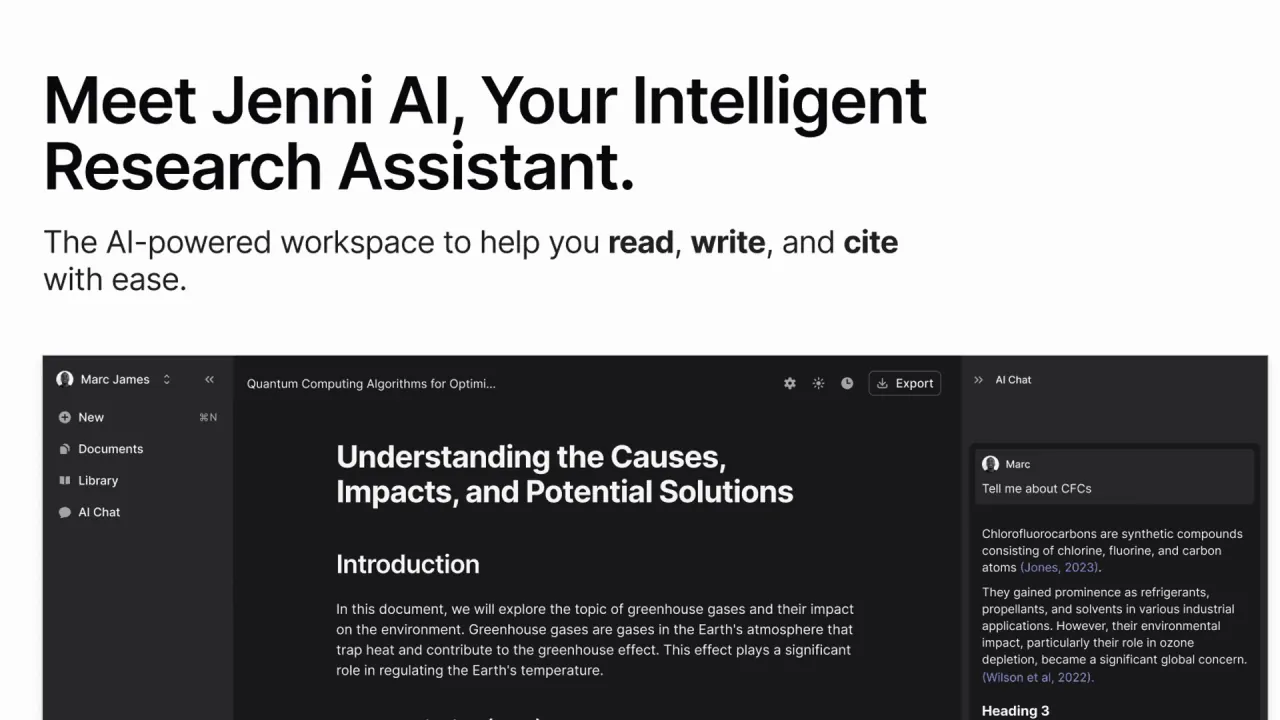
Jenni interface preview
Jenni logo

Jenni

Jenni is an AI academic writing assistant that drafts from the papers in your own library, inserts traceable in-text citations, and checks claims and sources before you submit.

ResearchEducationAI Writing#Research Assistant#Autocomplete#AI Writing Assistant
View Pricing
Saves
Visits
Views
Pricing
Paid
Published
Sep 28, 2026
Domain
jenni.ai
Community rating

Used this tool? Rate it

Rate this tool

Jenni Product Information

View Pricing
Tool Information
Saves
Visits
Views
Pricing
Paid
Published
Sep 28, 2026
Domain
jenni.ai
Community rating

Used this tool? Rate it

Rate this tool

Featured Tools

Related Tools

View Pricing

What is Jenni?

Jenni is an AI academic writing assistant that puts a reference library, a document editor and an AI chat in one workspace. The company describes it as the place where researchers read, write and cite, with every claim traceable to its source.

The product is run by Jenni AI, Inc., a company registered in Delaware, United States. A December 2025 business profile in tech media reported that the product narrowed its focus after marketing users drifted away while students and researchers writing academic papers kept using it.

Scale figures on the site are vendor-reported: the homepage cites over 6 million academics, an average of 5.2 hours saved per paper and over 15 million papers written on Jenni.

The practical difference from a general chatbot is where the text comes from. As an AI research paper writer, Jenni is built to draft from papers you have added, attach citations as it writes, and then check whether the finished paper's claims are supported by those sources.

Core features

Source library and paper search

  • Imports: You can drag in PDFs, import from Zotero or Mendeley, or let Jenni search more than 200 million papers.
  • Semantic search: Jenni's semantic search is designed to surface relevant papers even when you do not know the exact keywords, and the product page mentions access to over 10 million full-text Open Access papers without leaving the editor.
  • AI Chat over your library: Jenni's AI Chat reads your full library and responds with cited answers, so you can ask about a methods section or compare findings across uploaded papers.
  • Citation filters: Since an August 12, 2026 update, AI Chat responses can be filtered by publication year, impact factor, citation count and preprint status.

Source-grounded autocomplete

The core writing tool is an autocomplete that suggests the next sentence. Jenni says the suggestions are grounded in real papers and carry citations that can be traced back to the source.

Two settings change how much that matters. The autocomplete can draw exclusively from your curated library instead of generic training data, which keeps suggestions inside the literature you chose. Jenni also links each AI-suggested sentence to the exact page and paragraph in the source PDF, so a claim can be checked in one click instead of by re-reading the paper.

Citations

  • Styles: The site lists more than 10,000 citation styles, naming APA 7th, Chicago, Harvard, IEEE, Vancouver and journal-specific formats.
  • In-text citations: Citations are inserted inline while you write, and you can also trigger a citation search to find a paper for a specific statement. Together with the style list, this is what lets Jenni act as an AI citation generator inside its own editor.

Reviews before submission

Reviews is a checking pass run on a finished draft. It analyzes every claim in the paper, cross-references your sources and flags issues across six categories, such as claims that are unsupported, contradicted or overstated. The Reviews page says a scan returns results in seconds, and you can accept individual suggestions, whole categories or all changes.

  • Source Quality: Checks the bibliography for retractions, preprints, non-research documents, rarely cited papers and unverified journals, and lets you replace, remove or keep each flagged source. It also shows the publication-age distribution and the journals or venues a paper relies on.
  • Proofread: A separate check for grammar, word choice, formality and transitions, aimed at academic prose.

Collaboration and recent updates

  • Co-authoring: Documents can be edited together in real time, with suggested edits and sharing. Inline comments, live collaboration and version history are part of the same workspace.
  • Viewer and commenter roles: Added on September 23, 2026, these let a supervisor comment on or view a draft without edit access.
  • Charts: Since September 9, 2026, AI Chat can turn a finding into a chart that is placed directly in the document instead of pasted in as a flat image.
  • Prompt guidance: An August 26, 2026 update added guidance that learns as you write to improve the quality of suggestions.

Guide

A typical paper in Jenni follows the order the product is designed around:

  1. Build the library. Upload PDFs, save papers from the web with the browser importer, or bring in existing references. Jenni's Zotero and Mendeley integration lets you import from either manager, organize key papers into collections and cite while you write.
  2. Draft with autocomplete. Choose whether suggestions draw only from your library, then accept, edit or reject each suggested sentence.
  3. Ask AI Chat. Use @ to point the chat at specific PDFs, apply citation filters when recency or journal quality matters, and ask for charts of findings.
  4. Check before submission. Run Reviews for claim support and source quality, then Proofread for language.
  5. Export. Jenni exports documents to .docx, LaTeX or HTML; on the free plan the export covers body content only.

Jenni use cases and examples

  • Literature reviews: Jenni's AI Chat is pitched for understanding a methods section, comparing findings across papers or finding which source discusses a specific concept. That makes it most useful once the relevant papers are already in the library.
  • Theses and journal manuscripts: The team page highlights institutional case studies, including one saying LPU faculty increased their publication velocity with Jenni's research and writing support. Another credits Chula, which the page calls the top university in Thailand, with 750+ hours saved and 354 completed manuscripts. A third describes work with UNESCO's OWSD supporting female researchers in Nigeria. These are vendor-published results, not independent measurements.
  • Journal publication: Jenni says its users have published papers in 100+ journals and showcases open access articles it describes as planned and written in Jenni.
  • Polishing for non-native English writers: Proofread flags errors, warnings and suggested improvements, and the product page quotes a postdoc who says it removed the stress of matching scientific writing standards.
  • Pre-submission self-checks: Reviews and Source Quality target problems that reviewers notice, such as weakly supported claims, retracted papers and preprints cited as if they were published work.

Who is it for

Jenni lists graduate students and PhD candidates, universities and research labs, academic research teams, pharma and medical writers, policy and government analysts, market research and consulting, case law research, and healthcare and clinical evidence work as its users.

  • Good fit: People who already collect papers and want drafting, citing and claim checking to happen against that collection in one tool.
  • Students under academic integrity rules: The company says its tool is designed to enhance writing, that it does not generate entire essays, and that it does not endorse cheating or plagiarism.
  • Age: The terms say the service is intended for users who are at least 13, and minors need a parent or guardian's permission and supervision.
  • Regulated data: The terms state the services are not tailored to comply with industry-specific regulations such as HIPAA or FISMA, and users whose interactions would fall under such laws may not use the service. That matters for the clinical and pharma audiences Jenni markets to.

Platforms

  • Web app and mobile: Jenni runs as a web app, and its FAQ says it is designed to work across mobile and desktop devices.
  • Browser importer: The Jenni Web Importer saves sources from the web into your library, with install buttons for Chrome, Firefox and Edge and support on all Chromium browsers. For open access papers it fills in the full PDF, and each saved source can be assigned to a collection when you work on several papers.
  • Chrome Web Store listing: The importer's listing shows 20,000 users, as captured on September 28, 2026. It is at version 1.22, updated September 9, 2026.
  • Microsoft Word: A Word extension is announced, but its page offers a waitlist for access upon launch rather than an install.
  • Languages: The FAQ says you can generate text in your chosen language and use a translate feature to switch between languages.
  • Reference export: Every plan can export the library as .ris, .bib or .csv.

Pricing

PlanListed priceAI AutocompleteAI ChatReviewsWorkflow runsLibrary uploads
Free$0/month10 per day5 messages3310 PDFs
Plus$12/month5,000 per month500 per month10 per month10Unlimited
Pro$29/monthUnlimitedUnlimitedUnlimitedUnlimitedUnlimited

The plan comparison also sets file limits: PDFs up to 25 MB and 150 pages on Free, 100 MB and 500 pages on Plus, and 100 MB and 1,000 pages on Pro. Free exports body content only, while paid plans export all content. Plus includes 500 AI Edits per month and live chat support. Pro makes AI Edits unlimited and adds priority support.

The pricing page shows a Monthly and Annual toggle labeled "Save 60%", but the captured page does not state which billing cycle the $12 and $29 figures belong to, and prices for the other cycle were not displayed. Prices are in USD, with local currency available inside the app. No credit card is needed for the free plan, and the terms list Visa, Mastercard, American Express and PayPal as accepted payment methods.

  • Renewal: Subscriptions renew automatically until canceled.
  • Cancellation: You can cancel at any time from your account, and the cancellation takes effect at the end of the current paid term.
  • Refunds: All purchases are non-refundable unless required by law; the terms give European Union users the right to a refund within 14 days of signing up, upgrading or renewing.
  • Teams: Team plans offer single invoicing, an admin dashboard and a reduced price per seat for large teams, with pricing arranged through a demo rather than published.

Billing also comes up in public reviews. Recent reviews on the company's review-platform profile include reports of charges after the reviewer believed they had canceled. Others describe getting a refund after contacting support, including one reviewer who had bought an annual plan instead of a monthly one by mistake.

Jenni alternatives

On the same review platform, the Jenni AI profile lists Paperpal and QuillBot among the profiles people also looked at.

  • Paperpal: Also built for academic writing, with a checker suite for AI-generated text, plagiarism, reference errors and journal submission readiness. Paperpal also offers a Microsoft Word add-in and a browser extension that supports Google Docs and Overleaf. It suits writers who need integrity checks or want to stay in Word, where Jenni's own Word extension is still on a waitlist.
  • General chatbots: Jenni positions itself against ChatGPT, saying it builds arguments from your selected sources and ties claims to documents with clear references. A general chatbot may still be enough for brainstorming where citations are not required.

Limitations

  • Undisclosed models: The FAQ says Jenni uses the latest AI models and that different models perform better at different tasks, but no model names are given.
  • New papers arrive late: Papers may take up to 2 months to appear in academic databases; Jenni re-indexes citations every 48 hours.
  • Plagiarism wording: The FAQ says Jenni strives to generate content that is 100% plagiarism-free and adds a citation when a sentence derives from a web source. That is a goal, not a guarantee, and no plagiarism checker or AI detector is listed in the Jenni pages checked this round.
  • Inconsistent numbers across pages: The free plan card lists 3 AI Edits while the comparison table lists 5. The homepage mentions both 200M+ papers and 248M+ academic sources. The pricing page counts over 5 million academics rather than 6 million. The Chrome Web Store listing cites over 1,700 citation styles, against 10,000+ on the main site.
  • Mixed public ratings: The company-level review-platform profile shows 3.7 out of 5 from 156 reviews, with 65% five-star and 22% one-star ratings and 42 reviews in the last 12 months, as captured on September 28, 2026. The same profile notes that the company has not replied to negative reviews.

Privacy and data use

  • Model training: Jenni states it does not use user data, including text, prompts, citations or uploaded files, to train or fine-tune any language models, across all features.
  • Product analytics: Some of the content you write in Jenni is sent to PostHog for product analytics. The logged events include chat messages, surrounding document text sent as autocomplete context and the output of reviews.
  • Session replay: A small sample of editor sessions is recorded, and these recordings capture the text of the document, including unpublished drafts. Session replay and content-level analytics run by default until you deny analytics cookies, per user and per browser. Session recording and autocapture are disabled in the browser extension.
  • Not for advertising: The policy says this content is not sold, shared with advertisers or used for marketing.
  • Deletion: After account deletion, data is purged from active systems within 30 days and from encrypted backups within 60 days, and should be gone from all systems within 90 days. A full erasure closes the account and cannot be undone, but you can ask for only part of your data to be removed.
  • Draft wording in the policy: Several passages still contain bracketed text, such as support correspondence being kept for "[24 months]". The terms, last updated April 27, 2024, contain no clause on who owns AI-generated text.

FAQ

Q1. Will Jenni write my whole essay?

No, according to the company. Jenni says it does not generate entire essays; it suggests sentences as you write, cites them and checks the draft afterwards.

Q2. Is Jenni free to use?

Yes. The free plan costs $0 and includes 10 autocompletes per day, 5 AI Chat messages, 3 Reviews and 10 PDF uploads.

Q3. Does Jenni train AI models on my papers?

Jenni says it does not use your text, prompts, citations or uploaded files to train or fine-tune language models. Some written content still goes to its analytics provider unless you deny analytics cookies.

Q4. How recent are the papers Jenni can cite?

Jenni re-indexes citations every 48 hours, but papers can take up to 2 months to reach the academic databases it draws on.

Q5. Can I get a refund?

Purchases are non-refundable unless required by law. European Union users can request a refund within 14 days of signing up, upgrading or renewing.

Know a Similar Tool?
If you know other great AI tools, feel free to submit them to us